Page 7 of 9

Add Multiple Notes in One Day in Daily Notes

We’ve gone through some of your suggestions in the idea portal and we’ve noticed that some of them are actually available already in Daily Notes. We’ll be making a series of tips and tricks to better navigate your way around our app and we’ll be starting with adding multiple notes in one day.

It’s easy to add multiple notes in one day.  There are actually a couple of ways to do it:

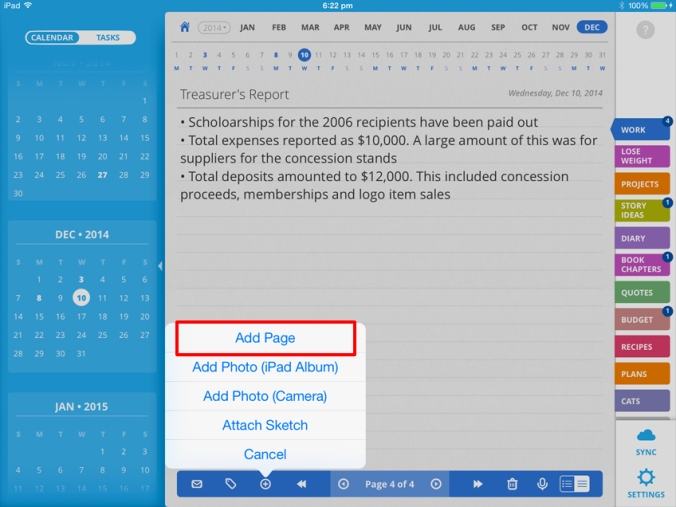
  1. From the bottom toolbar, tap the “Add’ icon.

    daily notes_journal app_recording app_task manager app_1
  2. Tap “Add Page” to add an additional page to the current day.
    daily-notes_journal-app_recording-app_task-manager-app_2

Continue reading

Retired Motorola Engineer’s Take on Daily Notes

We saw Web Baker’s enthusiastic feedback about Daily Notes, about how he turned it into a great Time Management System app and we just have to ask him his thoughts on life, passions and of course, Daily Notes.


Tell us your background.
Spent three years in the Army and achieved the rank of Sargent. After leaving the Army, I got a job at Motorola. At Motorola, I worked in the Printed Wiring Facility, and was promoted to a Process Engineer, in my Senior year at ASU. I retired from Motorola,  after (30) years and went to work for Maricopa County Environmental Services. Started out as a Microsoft Access Programmer, helping one Divisions modify/trouble shoot their databases. From there I went into Enforcement for a few years, ending up retiring from Business Services where I worked for and with the best ever people I have ever had the pleasure to work with. I retired from there after (16) years in October 2014.

Continue reading

How Daily Notes Works

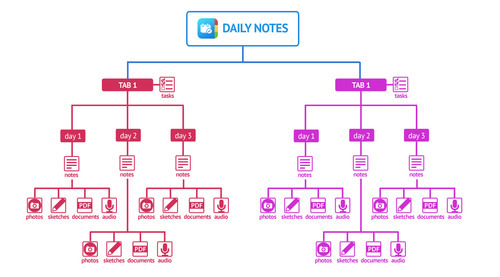
Daily Notes is a journal/ recording/ notes/ to-do list app all rolled into one but do you know how its basic structure works? Take a look at the image below:


Think of Daily Notes as having multiple notebooks a.k.a. “Tabs”. Each tab can represent a category such as Work, Personal, Diary, Research or any other aspects of your life.

Per “Tab” you can then notes, photos, recordings, sketches, PDF documents and even voice recordings. You can add multiple notes in one day, for different topics.
Continue reading

Winners of our Daily Notes Promo Code

image

Congratulation to the winners of our Daily Notes promo code raffle!

    Continue reading

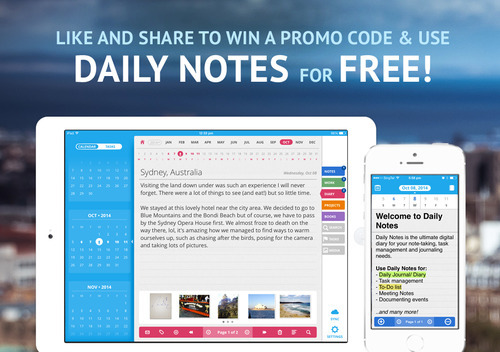
Win a promo code to use Daily Notes app for FREE!

That’s right, we’re giving away Daily Notes promo codes so you can get it, absolutely FREE! Do either of the following for a chance to win a promo code:

1. Facebook. 

Like our Daily Notes Facebook page then “like” and “share” our Daily Notes promo code post.image
Continue reading

« Older posts Newer posts »

© 2026 Daily Notes App

Theme by Anders NorenUp ↑